
Smart Restroom Occupancy
Invitals Smart Restroom Occupancy System
Privacy-preserving monitoring for safer, more efficient facilities.
Overview
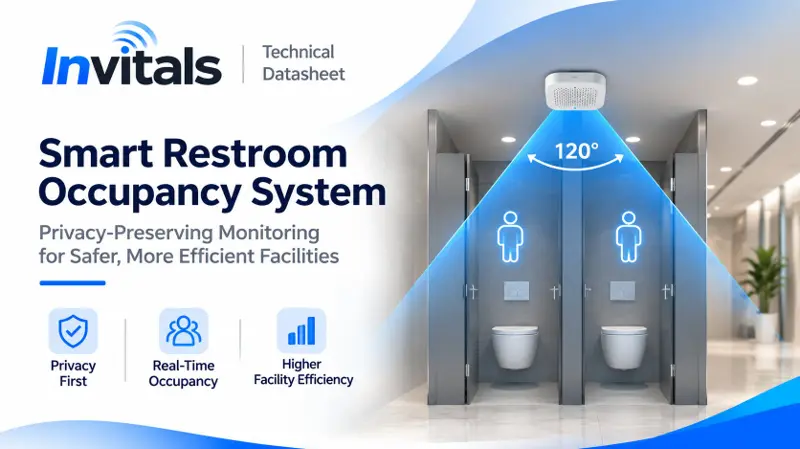
Invitals is a smart restroom occupancy system that uses non-imaging radar, not cameras, to detect whether each cubicle is occupied. One ceiling or upper-wall sensor covers up to two adjacent cubicles. It sends real-time occupancy, usage duration, multiple-person detection and queue counts to the Invitals portal, and alerts staff instantly by portal, email, WhatsApp or phone call.
Built for
- Shopping malls
- Airports & transport hubs
- Corporate offices
- Government buildings
- Hospitals & healthcare
- Schools & universities
See it in action
How does a smart restroom know which stall is free? · Watch on YouTube
Key capabilities
- 01
Privacy first
Non-imaging radar sensing. No cameras and no video recording.
- 02
Real-time occupancy
Live occupied and available status for every cubicle on the Invitals dashboard.
- 03
Safety alerts
Alerts when more than one person is in a cubicle or a cubicle stays occupied too long.
- 04
Higher facility efficiency
Queue counts, usage history and analytics help plan cleaning and staffing.
How it works
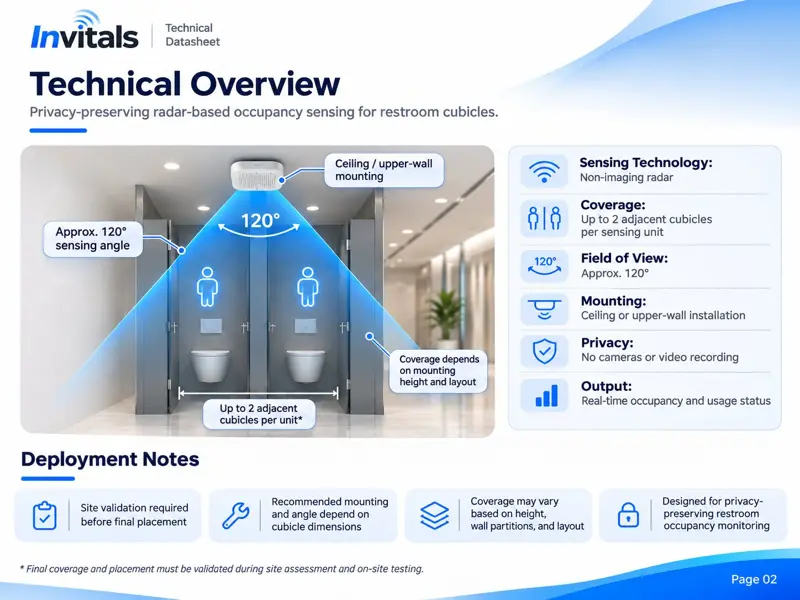
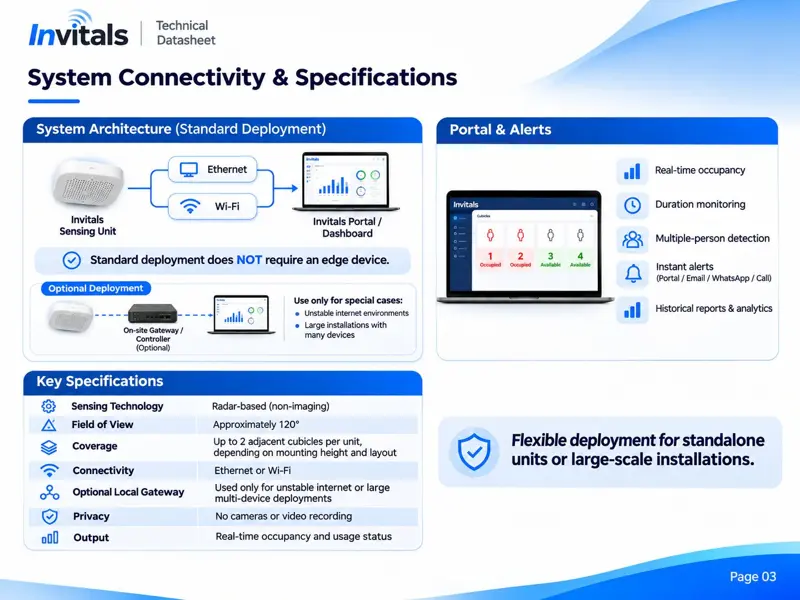
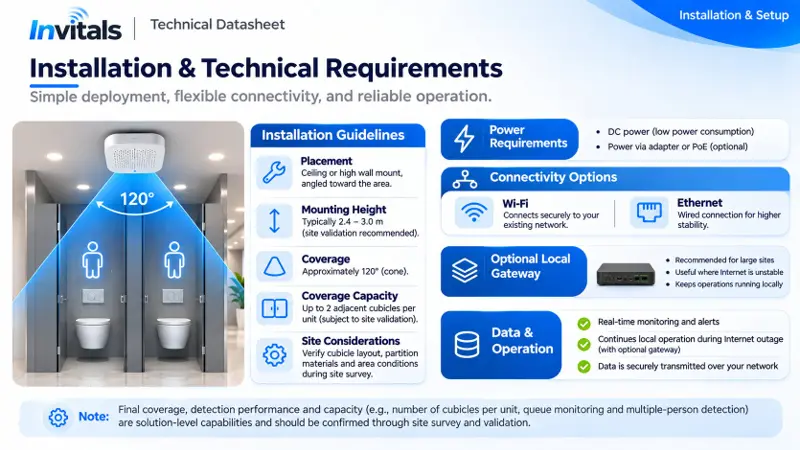
An Invitals sensing unit is mounted on the ceiling or high on the wall and angled toward the cubicles. Its radar covers a cone of about 120°, enough for up to two adjacent cubicles per unit depending on mounting height and layout. The unit connects over Ethernet or Wi-Fi straight to the Invitals portal and dashboard. A standard deployment does not need an edge device.
Intelligent monitoring and automated alerts
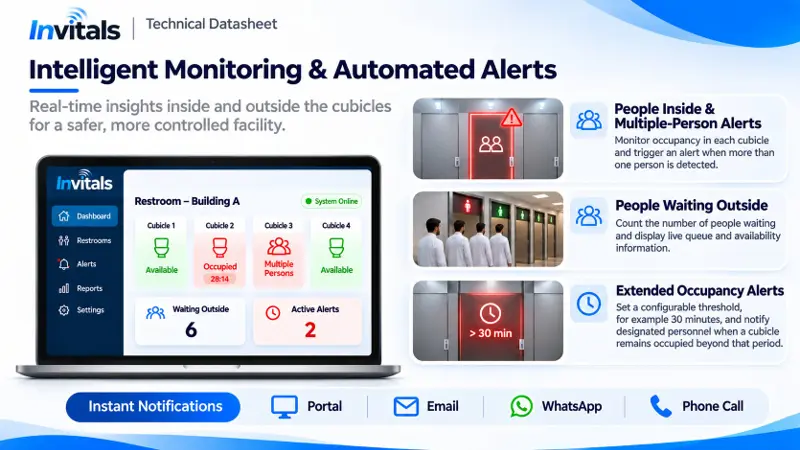
- People inside and multiple-person alerts: monitor occupancy in each cubicle and trigger an alert when more than one person is detected
- People waiting outside: count the number of people waiting and display live queue and availability information
- Extended occupancy alerts: set a configurable threshold, for example 30 minutes, and notify designated personnel when a cubicle stays occupied beyond it
- Instant notifications by portal, email, WhatsApp or phone call
- Duration monitoring, historical reports and analytics
Key specifications
- Sensing technology: radar-based (non-imaging)
- Field of view: approximately 120°
- Coverage: up to 2 adjacent cubicles per unit, depending on mounting height and layout
- Connectivity: Ethernet or Wi-Fi
- Optional local gateway: only for unstable internet or large multi-device deployments
- Privacy: no cameras or video recording
- Output: real-time occupancy and usage status
Installation and technical requirements
- Placement: ceiling or high wall mount, angled toward the area
- Mounting height: typically 2.4–3.0 m (site validation recommended)
- Power: DC power with low consumption, via adapter or PoE (optional)
- Connectivity: Wi-Fi connects securely to your existing network; Ethernet gives a wired connection for higher stability
- Site considerations: cubicle layout, partition materials and area conditions are verified during the site survey
Optional local gateway
For large sites, or where the internet connection is unstable, an optional on-site gateway or controller keeps operations running locally. Real-time monitoring and alerts continue during an internet outage, and data is transmitted securely over your network.
Deployment notes
Final coverage, detection performance and capacity, such as the number of cubicles per unit, queue monitoring and multiple-person detection, are confirmed through a site survey and on-site testing before final placement.
FAQ
Smart Restroom Occupancy: common questions
Does the Invitals system use cameras?
No. It uses non-imaging radar sensing. There are no cameras and no video recording, so it is designed for privacy-preserving restroom monitoring.
How many cubicles does one sensor cover?
Up to two adjacent cubicles per sensing unit, with an approximately 120° field of view. Final coverage depends on mounting height, partitions and layout, and is confirmed during a site survey.
How are staff alerted?
Alerts are sent instantly through the Invitals portal, email, WhatsApp or a phone call, for example when more than one person is in a cubicle or a cubicle stays occupied beyond a set time such as 30 minutes.
Do I need an edge device or gateway?
Not for a standard deployment: sensors connect over Ethernet or Wi-Fi directly to the portal. An optional local gateway is recommended for large sites or where the internet is unstable, so monitoring continues during an outage.
What power and mounting does it need?
Low-consumption DC power via an adapter or optional PoE, mounted on the ceiling or high on the wall, typically at 2.4–3.0 m.
Get started
Talk to a smart restroom occupancy specialist.
Share a few details and we’ll come back with ideas, a site survey or a live demo.
Ready to transform your space?
Tell us about your project and get a free consultation, site survey or live demo from our team.